Showing posts with label Software. Show all posts

Saturday, 17 October 2015

        Aqua Snap Window Manager
Are you tired of shuffling back and forth between windows?  Here’s a handy app that can help you keep all of your windows organized and accessible.
AquaSnap is a great free utility that helps you use multiple windows at the same time easily and efficiently.  One of Windows 7’s greatest new features is Aero Snap, which lets you easily view windows side by side by simply dragging windows to side of your screen.  After using Windows 7 for the past year, Aero Snap is one of the features we really miss when using older versions of Windows.
With AquaSnap, you now have all of the features of Aero Snap and more in Windows 2000, XP, Vista, and of course Windows 7.  Not only does it give you Aero Snap features, but AquaSnap also gives you more control over your windows to make you more productive.
AquaSnap is a a free download for Windows 2000, XP, Vista, and 7.  Download the small installer (link below) and install it with the default settings.
sshot-56
AquaSnap automatically runs as soon as it is installed, and you will notice a new icon in your system tray.
image
Now you can go ahead and put it to use.  Drag a window to any edge or corner of your desktop, and you will see an icon showing what part of the screen the window will cover.
image
Dragging it to the side of the screen expanded the window to fill the right half of the screen, just like the default Aero Snap in Windows 7.  You can drag the window away to restore it to its former size.
image
AquaSnap works on any corner of the screen too, so you can have 4 windows side-by-side.  We already have 3 windows snapped to the corners, and notice that we’re dragging a fourth window to the bottom right corner.
image
You can also snap windows to the bottom and top of the screen.  Here we have Word snapped to the bottom half of the screen, and we’re dragging Chrome to the top.
image
You can even snap internal windows in Multiple Document Interface (MDI) programs such as Excel.  Here we are snapping a workbook in Excel to the left to view 2 workbooks side-by-side.
 image
Additionally, AquaSnap lets you keep any window always on top.  Simply shake any window, and it will turn semi-transparent and stay on top of all other windows.  Notice the transparent calculator here on top of Excel.
image
All of AquaSnap’s features work great in Windows 2000, XP, and Vista too.  Here we are snapping IE6 to the left of the screen in XP.
sshot-62
Here are 3 windows snapped to the sides in XP.  You can mix the snap modes, and have, for instance, two windows on the right side and one window on the left.  This is a great way to maximize productivity if you need more space in one of the windows.
sshot-60
Even AquaShake works to keep a window transparent and on top in XP.
sshot-61
Settings
AquaSnap has a detailed settings dialog where you can tweak it to work exactly like you want.  Simply right-click on its icon in the taskbar, and select Settings.
image
From the first screen, you can choose if you want AquaSnap to start with Windows, and if you want it to show an icon in the system tray.  If you turn off the system tray icon, you can access the AquaSnap settings from Start > All Programs > AquaSnap > Configuration (or simply search for Configuration in Vista or Windows 7).
image
The second tab in settings lets you choose what you want each snapping region to do.  You can also choose two other presets, including AeroSnap (which works just like the default Aero Snap in Windows 7) and AquaSnap simple (which only snaps at the edges of the screen, not the corners).
image
The third tab lets you increase or decrease the opacity of pinned windows when using AquaShake, and also lets you increase or decrease the shaking sensitivity.  Additionally, if you prefer the standard AeroShake functionality, which minimizes all other open windows when you shake a window, you can choose that too.
image
The fourth tab lets you activate an optional feature, AquaGlass.  If you activate this, it will make windows turn transparent when you drag them across the screen.
image 
Finally, the last tab lets you change the color and opacity of the preview rectangle, or simply turn it off.
image
Or, if you want to temporarily turn AquaSnap off, simply right-click on its icon and select Off.  In Windows 7, turning off AquaSnap will restore your standard Windows Aero Snap functionality, and in other version of Windows it will stop letting you snap windows at all.  You can then repeat the steps and select On when you want to use AquaSnap again.
image
Conclusion
AquaSnap is a handy tool to make you more productive at your computer.  With a wide variety of useful features, there’s something here for everyone. 
Download Link :- Official Site

Sunday, 4 October 2015

           DFX Audio Enhancer ( with crack )


Sound is definitely a big part of our life. Depending on its nature, strength or musicality, sound can be perceived differently as pleasant or totally unwelcome. This is the case of the sound that your computer emits, too. When it comes to accuracy, it doesn't take a specialist to understand what audio quality means – the moment you hear a high-fidelity song, you will enjoy every second of it.
Listening to on-line radio, your personal music files or audio from any website has become one daily activity for most people that work with computers. Thus, making this experience one to please the ear is what audio enhancement software does or at least tries to accomplish. DFX Audio Enhancer is a member of this category and one of the top choices in most cases.
Audio quality has two main aspects when analyzed on PCs – hardware and software. Poor sound may be the result of low hardware performance or reduced audio stream bitrate that narrows the frequencies and even eliminates many of them. Software driven solutions are available though and they brag on performing miracles in order to provide increased sound quality even in worst case scenarios.
DFX Audio Enhancer supports almost every application that plays audio streams from Internet browsers to media players. The list consists of major players in the industry such as Internet ExplorerFirefoxChrome or Opera and Windows Media PlayerWinampVLC media player,foobar2000GOM PlayerBS.Player or iTunes.
This particular audio enhancement software allows you to check which applications to monitor and apply its processing to within the installation operation. Once it fires up, you can start tuning the audio stream by selecting levels for sound `Fidelity`, `Ambience`, `3D Surround`, `Dynamic Boost` and `Hyperbass`. The `Spectrum` area displays a frequency vu-meter to check for consistency each time you come up with a new preset.
You can quickly switch between speakers and headphones, music types and speech. The `Presets` menu comes packing a collection of predefined settings as well as the `Song Association` section that helps you match certain songs with the preset of your choice that will be automatically enabled upon playing. You can also backup and restore your whole preset library using the `Archive` sub-menu.
DFX Audio Enhancer brings lots of added quality to the audio stream and that's exactly what it's supposed to do. Its performance depends solely on it is utilized – a misjudged preset may completely destroy the listening experience while well-thought settings surely make it addictive. Once you find your best preset collection, this audio plug-in will turn out to be one of your start-up items.

Download link :- Official Site


Enjoy :D


        Power DVD 15 Ultra With crack (100% working )

The Truest Home Theater Experience

With support for all media types including video, audio and photographic content, PowerDVD is your all-purpose entertainment station. Enjoy media on PC, mobile devices, home networks, from the cloud, and even social networks. In the NEW PowerDVD 15, enhanced audio-visual quality, extended file format support, improved functionality, refinements to the user interface, and more, enhance a wide range of digital media experiences.


MultiCam Editing

Premium Movie Experience

TrueTheater® technology and smart buffering algorithms provide a smoother, richer visual and acoustic experience for movies and videos.
For over 10 years, PowerDVD has been the world’s top-selling movie player. Each new version from CyberLink’s design team introduces innovations in entertainment built on years of engineering excellence.

PowerDVD 15 takes your movie experience to new places with playback enhancements and format support additions you won’t find in any other player.

MultiCam Editing
MultiCam Editing

MultiCam Editing

Cinema Quality Audio for Your Movies

Enjoy a truly immersive movie experience with support for master-quality audio technology from leaders in the digital audio industry - Dolby and DTS.
Lossless pass-through for Dolby TrueHD and DTS-HD Master Audio
Support for HDMI 1.4 for multi-channel high definition audio
Enjoy cinematic soundtracks with 7.1 channel audio
Expand 2-channel audio to 6.1 channel sound with Dolby Digital EX

These are the major features of power dvd .............. It is one of the heavy massive player found in windows .......but it is not as good as windows media player with intergrated lav decoding system and nvidia cuvid


                                                                                                                   Download link :- Click here ( linux server download link )

Crack :- Solidfiles link


Saturday, 22 August 2015

          Smart Windows App Blocker v2.0


Smart Windows App Blocker is the Free Tool to quickly Block or Unblock any Windows Application with just a click.
It is ideal tool for administrators to block access to privileged or sensitive applications. Also parents can use it to prevent their kids from running certain programs.

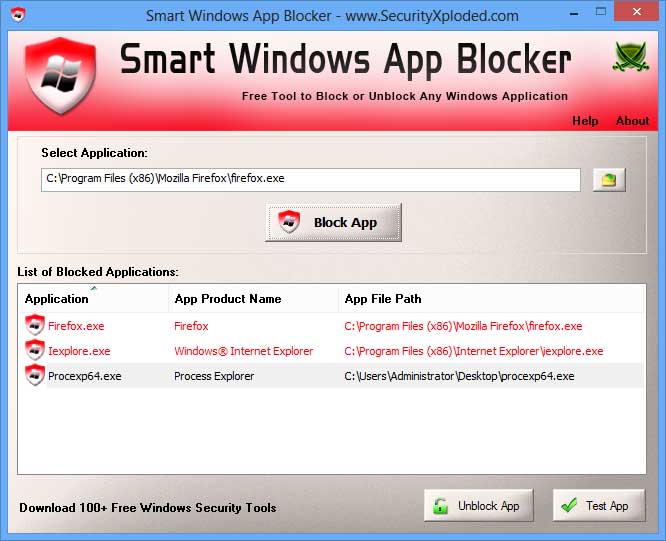
Anytime, it displays detailed list of all the Blocked Applications. You can select any of the Blocked app andunblock it instantly.

Once you block or Unblock the application, it is effective immediately. There is no need to log-off or restartthe system.

One of the unique feature of this tool is that it allows you to TEST the blocked app for quick verification to see if if it is really disabled or not.

It is fully portable and can be run directly without JAVA, .NET or any other components. It works on both 32-bit & 64-bit systems starting from Windows XP to Windows 8.


Features & Benefits
  • Instantly Block or Unblock any Windows Application/Process/Program
  • No need to log-off or restart the system
  • Displays list of all the Blocked applications
  • Test the Blocked Application for quick verification
  • Useful for Administrators and Parents
  • Supports quick Drag & Drop of Application
  • Free and Very Easy to Use Tool
  • Fully Portable, does not require Java or .NET
  • Includes Installer for local Installation & Uninstallation. 
 
 
Installation & Uninstallation
Smart Windows App Blocker comes with Installer to make it easier to install it locally on your system for regular usage. This installer has intuitive wizard which guides you through series of steps in completion of installation.
 
At any point of time, you can uninstall the product using the Uninstaller located at following location (by default)
 
[Windows 32 bit]
C:\Program Files\SecurityXploded\SmartWindowsAppBlocker

[Windows 64 bit]
C:\Program Files (x86)\SecurityXploded\SmartWindowsAppBlocker


How to Use?
Smart Windows App Blocker is easy to use with its simple GUI interface.

Here are the brief usage details
  • Launch SmartWindowsAppBlocker on your system as Administrator
  • Just 'Drag & Drop' your Application EXE file or click on Browse button
  • After selecting the app, just click on 'Block App' to quickly Block it. On success, it will be added to list of Blocked Applications.
  • Now you can select the app and click on 'Test App' to quickly verify it.
  • Anytime you can select the App from the displayed list and unblock it by clicking on 'Unblock App' button.


Screenshots
Screenshot 1: Smart Windows App Blocker showing all the Blocked Apps on Windows 8.
 
SmartWindowsAppBlocker showing recovered passwords 


Release History
Version 2.0 :  8th Jan 2015
Integrated Uninstaller into Windows Add/Remove Programs, now you can uninstall it in a standard way.
 
Version 1.5 :  13th Nov 2013
Right click list menu to quickly copy the Application File Path
 
Version 1.0 :  4th Sep 2013
First public release of SmartWindowsAppBlocker


Download LINK :- Softpedia Link


Tuesday, 26 May 2015

        Facebook Messenger Panel For

                  Mozilla Firefox

Integrate Facebook Messenger with Firefox in a simple way.Integrate Facebook Messenger with Firefox in a simple way.


The button opens a panel that you can close just with "Esc" key or clicking elsewhere.
You can change the size of the panel.
You can move the panel.
It's a button that you can move everywhere.
Configurable shortcut key.
Can pin the panel: This is useful, for example, when you need to change to another window and you need keep the panel open.
Toolbar with the following buttons: Reload, Show/Hide toolbar, Pin/Unpin Panel and Close Panel.

Download It From Official Monzilla Add On site : - https://addons.mozilla.org/en-US/firefox/addon/facebook-messenger-panel/?src=cb-dl-hotness

Friday, 22 May 2015

Data Copying

Talent Copy (64 Bit & 32 Bit)


Talent Copy is a free file management tool developed for Windows by Ventislav Alexandriyski.

Talent Copy is a lightweight tool that quickly copy files in HDD easier, preventing HDD from wearing and damage. It uses advanced algorithm to limit empty HDD head moves, HDD waste, noise and power on the file copying and dramatically increase copying speed.

Talent Copy is more appropriate for SDD drives, since it splits files copy process on read and write operation and allows SDD drives to work at maximum speed and files copy performance.


Download Link :- 64 Bit   32 Bit